

Money Map · iPhone & Mac
Budgeting that never asks for your bank login.
Money Map is a personal budget for iPhone and Mac that works without connecting to your bank. No Plaid. No account. No password. You import the file your bank already gives you — or type it in — and your data stays in your own iCloud.
Why Money Map
Private by architecture, not by promise.
There is no server holding your transactions, because there is no server. The privacy is structural — it is not a setting you have to trust us to honour.
No bank connection
No Plaid, no Yodlee, no credentials to hand over. There is no account to create and no password to breach, because there is no server holding your transactions.
Imports the file your bank gives you
Drop in a .QFX and it just loads — no field mapping. Or import a .CSV and map the columns once. JSON works too.
Your data, your iCloud
Everything syncs through your personal iCloud, encrypted by Apple. RationalBit cannot read it. Lock the app behind Face ID.
Budget by percentage
Set each category as a fixed amount or a percentage of income — so a 50/30/20 budget re-allocates itself when your income changes.
Screenshots
See it before you install it.
Every screen below is the actual app, not a mockup.
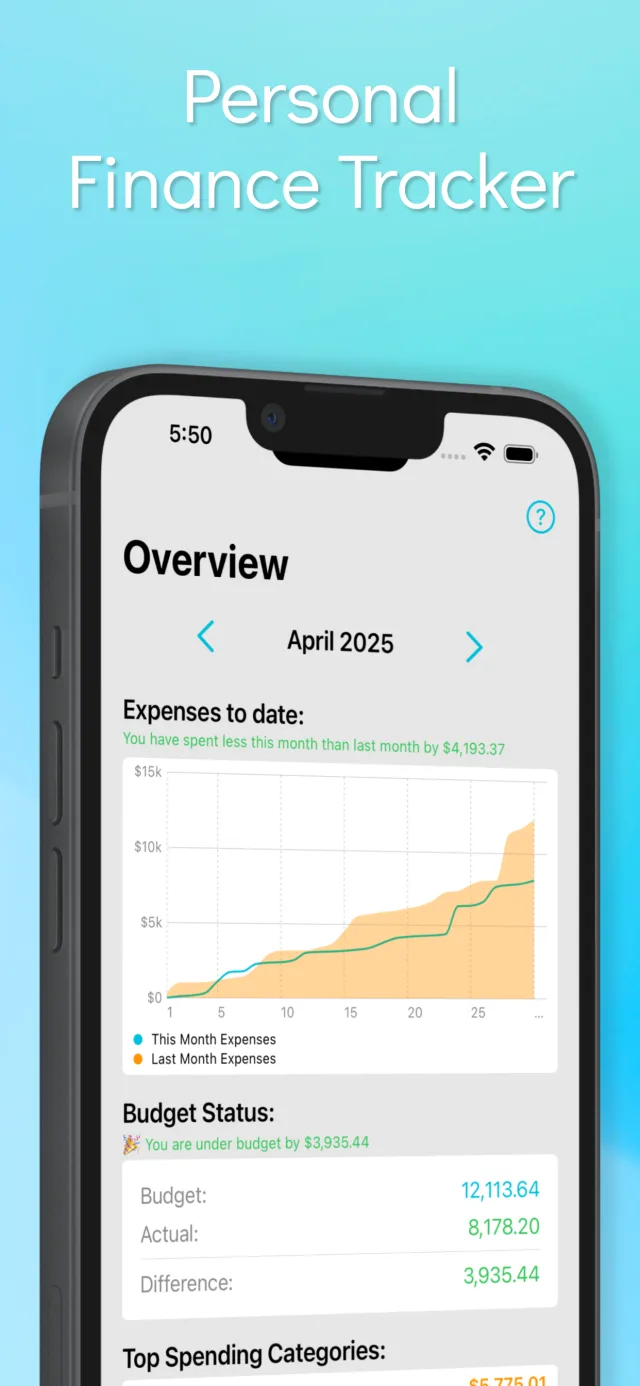
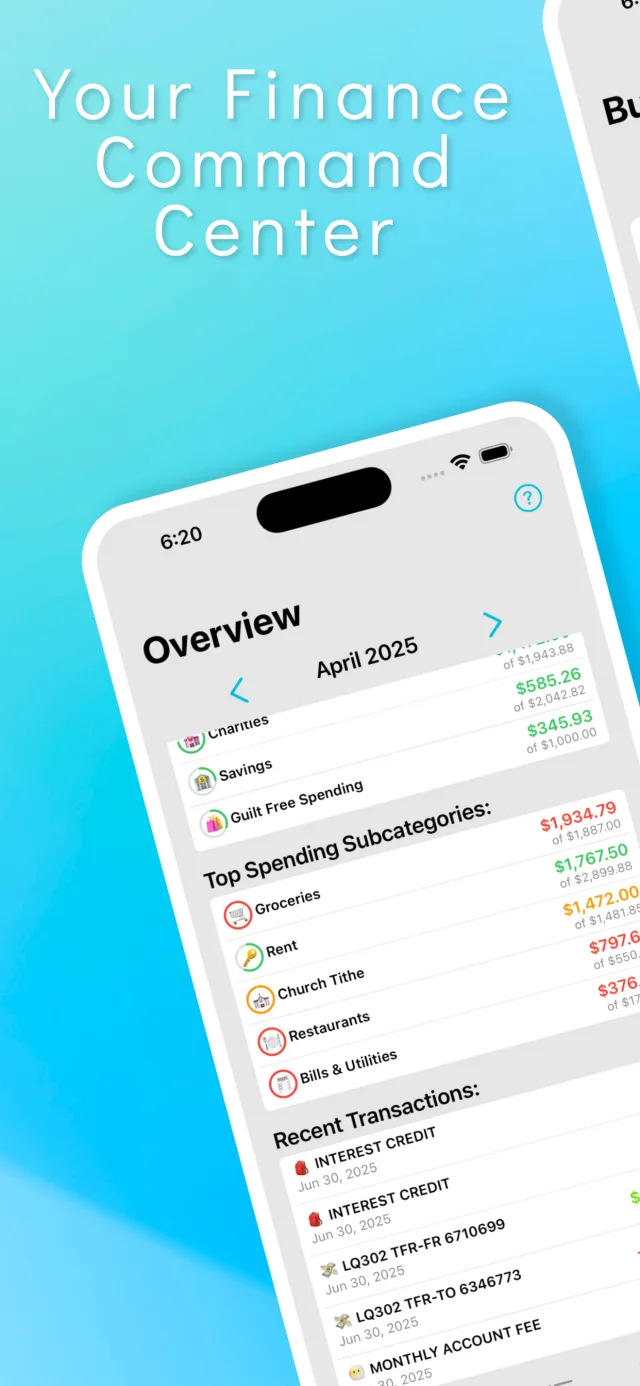
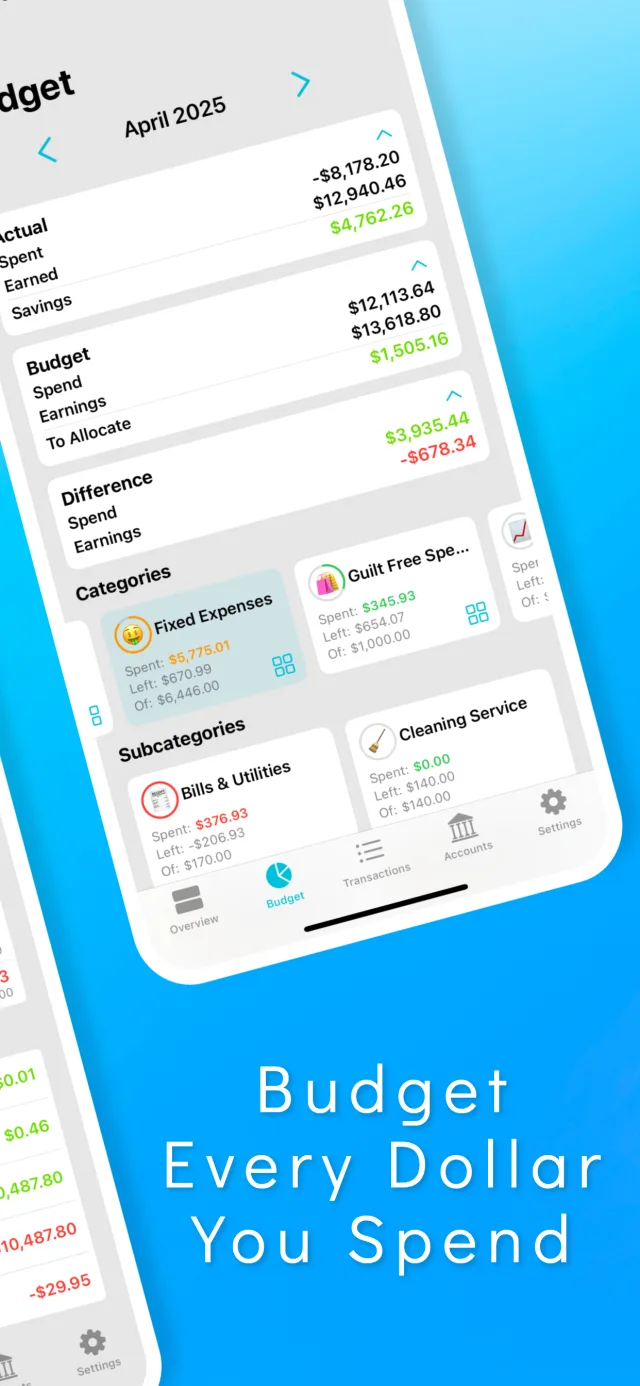
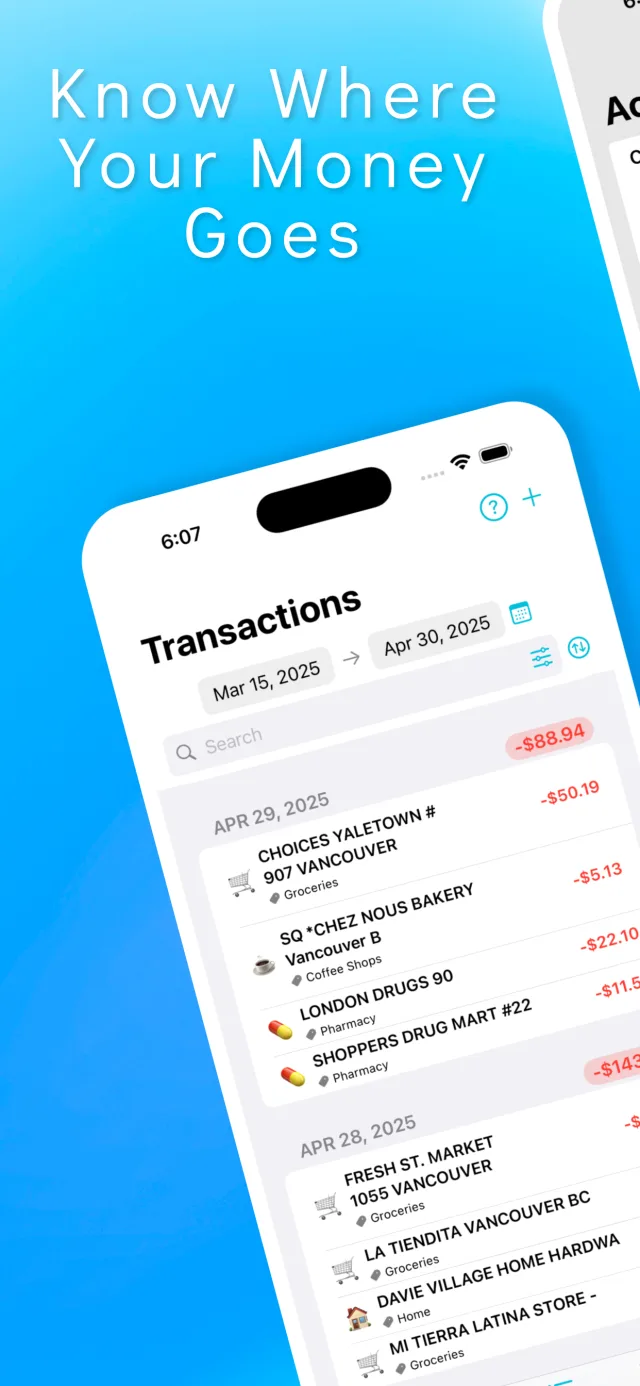
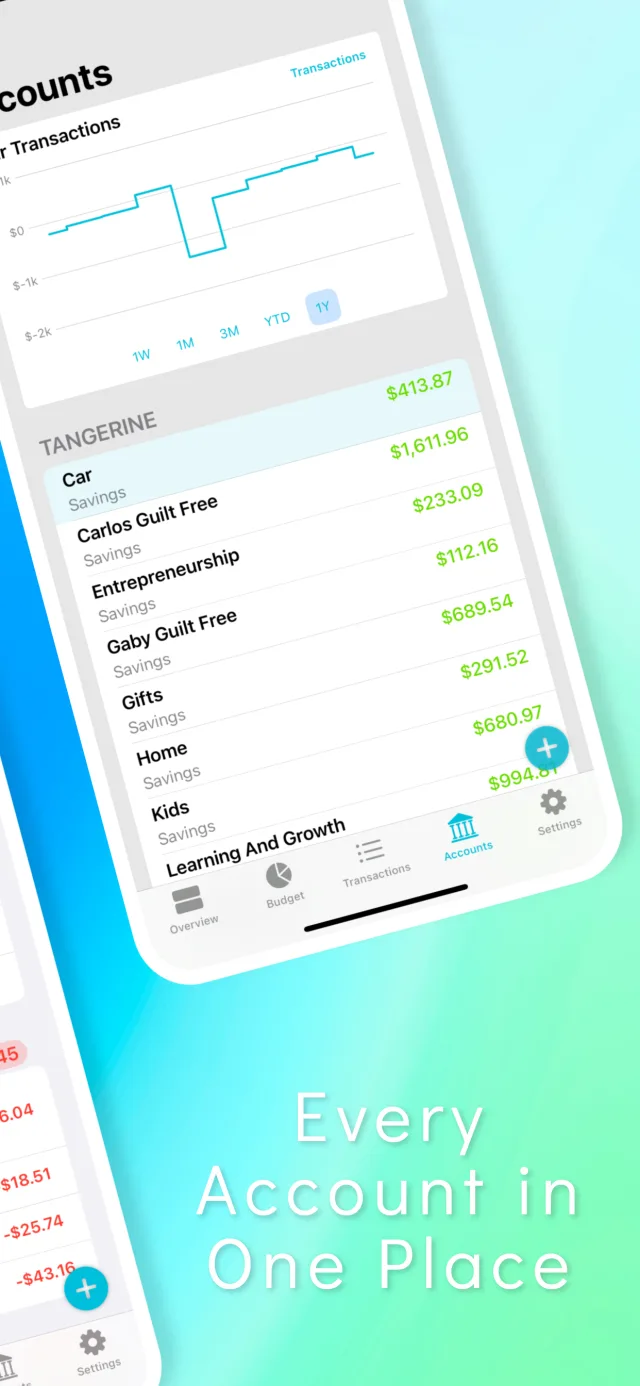
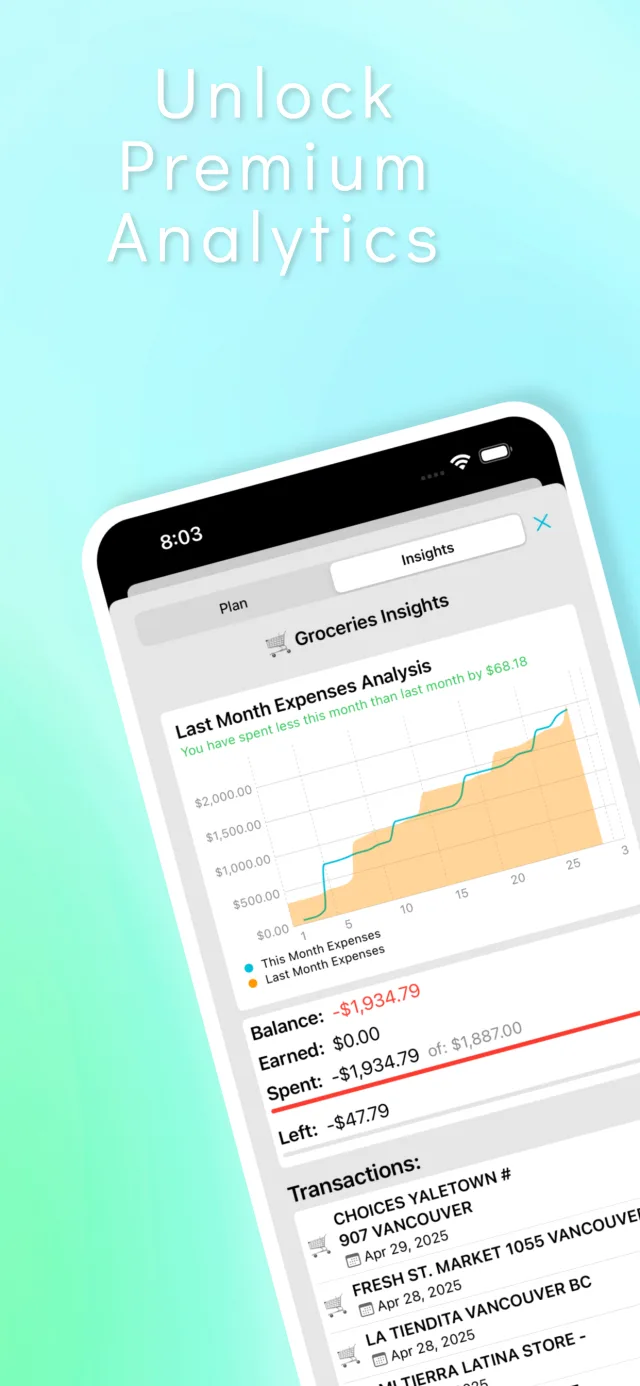
Swipe to see more
How it works
Four steps, then it's just a budget.
The hard part of any budget app is getting your transactions in without surrendering your bank login. Money Map's answer is the file your bank already gives you.
Get your transactions in
Export a statement from your bank as .QFX or .CSV, then open Transactions → + and pick the file. QFX loads with no setup at all. For CSV you map the columns once — Date, Amount, Description — and Money Map remembers. Prefer to type as you go? Do that instead. Nothing is ever required to phone home.
Read the import walkthroughShape your categories
Build categories and subcategories that match how you actually spend — Groceries under Needs, Coffee under Wants. Set recurring transactions once for rent, salary and subscriptions so they stop being a monthly chore.
Budget in dollars or percentages
Give each category a fixed amount, or a percentage of what you earn. Percentages are what make rules like 50/30/20 survive a raise, a bonus or a slow freelance month without you recalculating anything.
Set up a 50/30/20 budgetWatch where it actually goes
See what's left in every category, compare this month against last, and drill into any subcategory to find the line item that keeps quietly eating the budget.
Guides
The questions that brought you here.
Each guide answers a real question completely — and only then shows you how Money Map handles it.
How to open a QFX file without Quicken
QFX files won't open on iPhone — unless you have the right app. Three ways to read a .QFX, convert it to CSV, or import it straight into a budget.
Read the guideHow to budget without linking your bank account
You can budget without ever connecting your bank. Here's how manual entry and file imports actually work — and the private iPhone app that does both.
Read the guideHow to import a bank statement into a budget app
Download a CSV or QFX from your bank and import it — skip both hand-typing and bank logins. A step-by-step walkthrough, including column mapping.
Read the guideLeaving Quicken: a real alternative for iPhone and iPad
Moving off Quicken? Export your .QFX transactions and import them into an iPhone and Mac budget app with no bank sync — your data in your own iCloud.
Read the guideHow to actually run a 50/30/20 budget on your iPhone
The 50/30/20 rule only works if your app budgets by percentage, not fixed dollars. Here's how to set it up on iPhone in about five minutes.
Read the guideFAQ
Including the answers that lose us installs.
If Money Map is the wrong tool for you, we'd rather you find out here than after you've downloaded it.
Does Money Map connect to my bank?
No — and that is deliberate. Money Map has no bank connection, no Plaid or Yodlee integration, and no login. Transactions get in one of two ways: you type them, or you import a file you downloaded from your own bank. That means no auto-refreshing balances, which is a real trade-off worth understanding before you install.
How to budget without a bank loginCan Money Map open a QFX file on iPhone?
Yes. Money Map imports .QFX (Quicken Web Connect) files directly on iPhone and Mac, with no field mapping — you pick the file and the transactions load. This is worth stating plainly because most pages on the subject claim it can't be done on iOS.
How to open a QFX file without QuickenHow much does Money Map cost?
It's free for up to 100 transactions, which is enough to decide whether the app fits how you think. Unlimited transactions require a subscription — current pricing is shown in the App Store. There is no one-time unlock.
Where is my financial data stored?
In your own iCloud, encrypted and managed by Apple. RationalBit runs no server that holds your transactions and cannot read them. You can also lock the app behind Face ID or Touch ID. Note that this means Money Map is not an offline-only app — it does sync through iCloud.
Where your data actually livesIs Money Map a good Quicken alternative?
For budgeting and transaction history on iPhone and iPad, yes — it imports the same .QFX files your bank exports for Quicken. But be clear-eyed: it does not track investments, generate tax reports, or do double-entry accounting, and its unlimited tier is also a subscription. If you need those, a desktop tool will serve you better.
Leaving Quicken for iPhone and iPadCan I run a 50/30/20 budget in Money Map?
Yes. Budgets can be set as percentages rather than fixed dollar amounts, which is exactly what the 50/30/20 rule needs — when your income moves, the three buckets re-allocate themselves instead of you recalculating them by hand.
How to run 50/30/20 on iPhoneDoes Money Map do envelope budgeting?
No. Money Map does category budgets with fixed or percentage-based amounts, which is a different mechanic from envelope budgeting. If you specifically want envelopes, Goodbudget or YNAB will fit you better — we'd rather say so now than have you find out after installing.
Do I need an account or an email address?
No. There is no sign-up, no email and no password. You open the app and start. Because there is nothing of yours on our side, there is nothing on our side to leak.
Budget apps that don't use PlaidYour budget. Your data. Your iCloud.
Free for your first 100 transactions — enough to know whether it fits how you think.
Free for up to 100 transactions. Unlimited transactions require a subscription.